The footprint of the Air Ajax runtime
When I started to use Spaz, I naturally twitted about it and of one my friends tried it. He recognized that the application was better than Twitterific but did not adopt Spaz because of the OS resources consumed by the application. I know a bit the heart of Spaz as I developped a few of its features, I know that it does not waste resources and I concluded that perhaps the runtime could be the cause of this overhead.
This morning, I downloaded one of the simplest applications written in Air Ajax, the classic Hello World application. I simply executed the application adl -nodebug application.xml and used the Activity Monitor utility provided by Apple to measure the memory and CPU footprint. The question is simple: what is the overhead of an application that nearly does nothing and have nearly zero state ? Note that I use the -nodebug switch which optimizes the runtime, thanks to Ed Finkler that gave me the hint. It helps to reduce the CPU used by the application by a factor of 2. The first version of this entry did not take it in account.
Disclaimer: this test is very subjective and if someone else performs the same test, he will likely find a different result.
The answer is pretty big for me. My machine is a MacBook Pro 2ghz with 2 gigs of RAM (I can’t have more because it’s one of the early models). The application uses constantly around 2% of CPU and 20 megs
It is way too much for desktops. I wondered then how does it scale if I run 10 times the same application ? Perhaps that Air has a smart runtime that can collocate resources ?
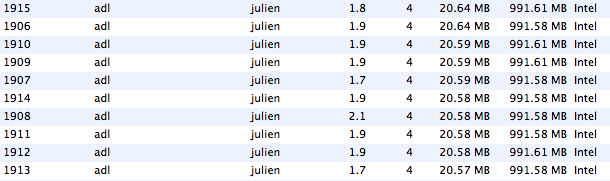
According to my results, running 10 Hello World application consumes around 200 megs of RAM and around 20% of my CPU. Clearly I see a problem here, how can the end user really uses several Air applications at the same time without consuming too much OS resources ?
That reminds me the story of the Java virtual machine. Back in 2000, the early versions of the Java virtual machine were slow and gradually they improved the performance of their virtual machine. If I remember correctly the JDK 1.4 was the first release to provide decent CPU performances and then each major release had seen decent performance boosts. BTW: Sun’s VM also uses lot of memory but the CPU footprint is nearly zero. Reducing memory overhead is not achieved yet, I know they have plans to collocate if you execute several virtual machine though, I am not an expert.
I hope that Air will follow the same path and that Adobe will invest in the optimisation of the runtime. In my opinion it is a key factor to increase the adoption of the platform.
blog comments powered by Disqus